
TikTok Video Downloader
Download TikTok videos without watermark, save photo posts and stories, and extract MP3 audio — free, with no app and no account.
Save Public TikTok Videos Without Leaving Your Browser
MusicallyDown is a free tool that runs entirely online and saves public TikTok posts for you. There is nothing to install and no registration to complete. You hand it the link to a TikTok post, it retrieves the original file stored behind that post, and you keep a clean MP4 — no watermark baked into the picture, no username floating in the corner, and the audio exactly as the creator posted it.
The same box covers TikTok’s other formats too. A slideshow post comes out as separate full-size photos. A story can be grabbed before its 24 hours run out. And when only the sound matters — a track, a voiceover, a clip everyone is using — the MP3 option saves just the audio. Paste any public link and the tool works out what kind of post it is pointing at.
How to Download a TikTok Video
Step 1: Copy the link. In the TikTok app, open the post, tap Share and then Copy Link. On a computer, copy the URL from the browser’s address bar instead. The post has to be public.
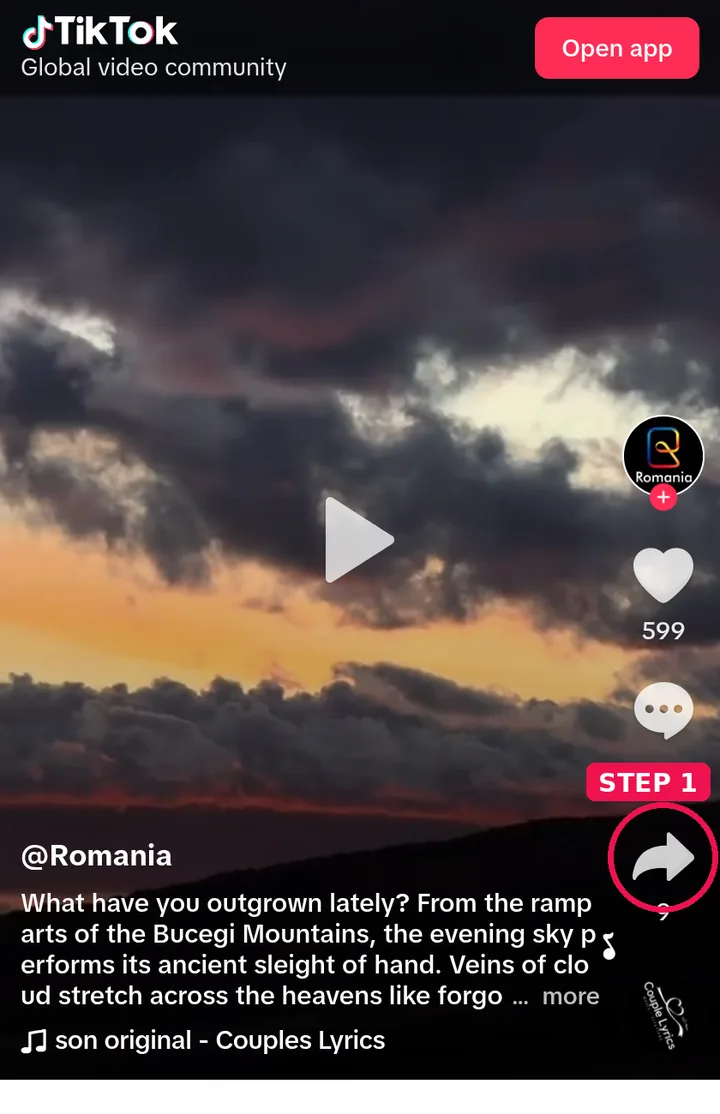
Step 2: Paste it into the box. Drop the link into the field at the top of this page and press Paste, or type it in by hand.
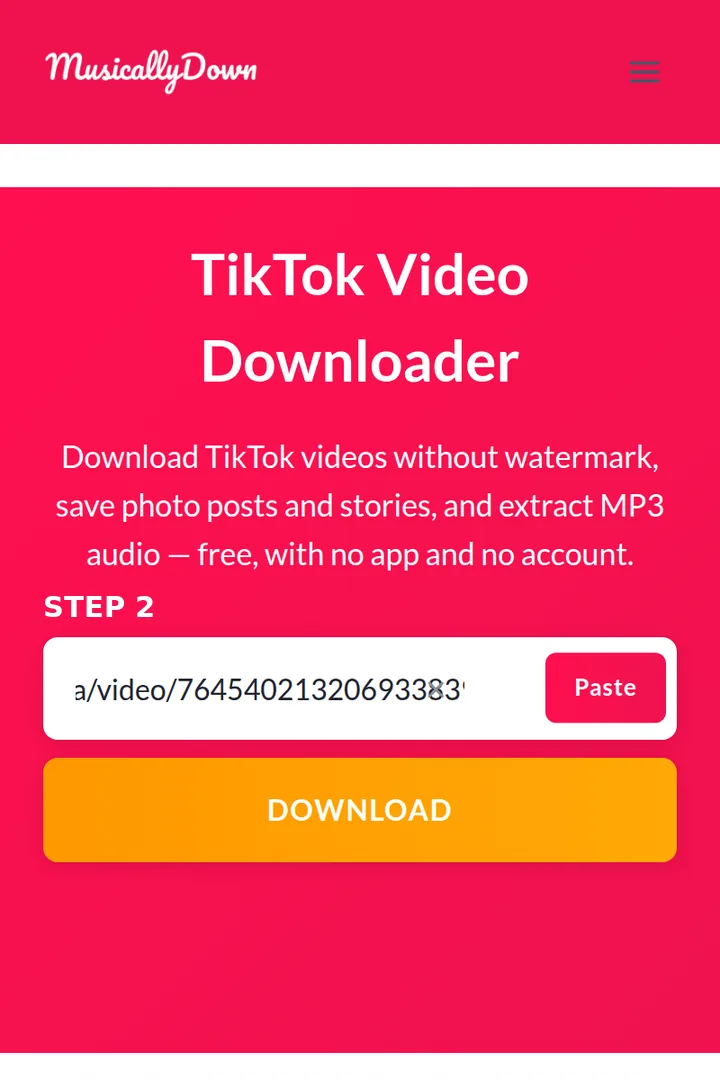
Step 3: Press Download. The tool looks the post up and builds your options. This normally takes a few seconds.
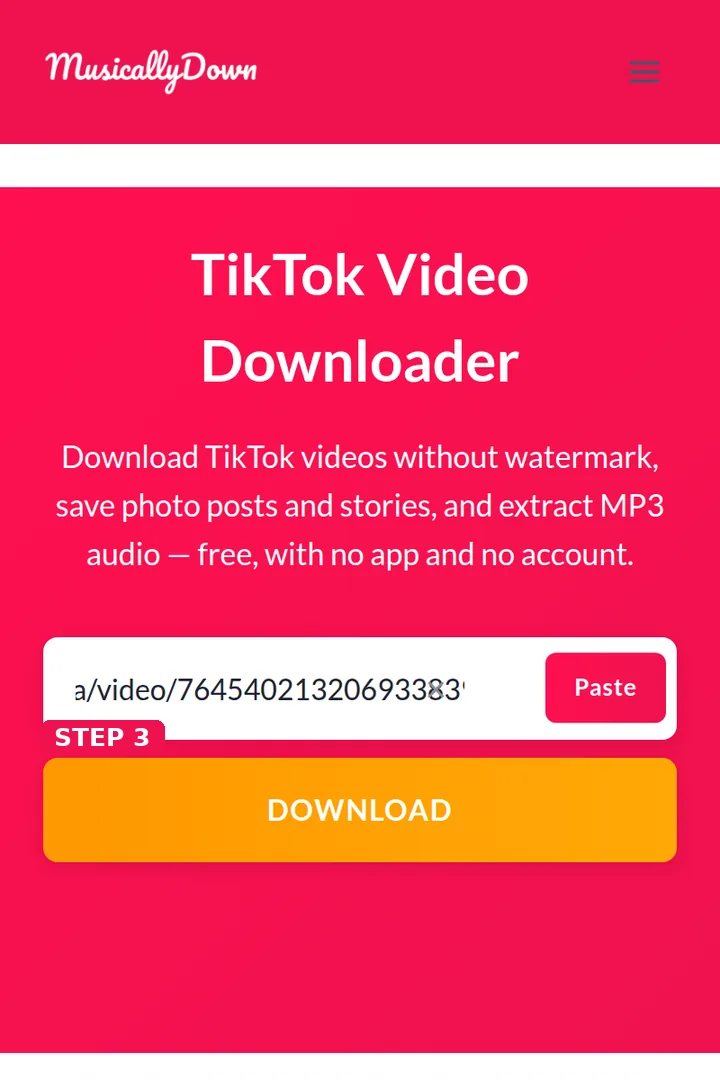
Step 4: Pick your file and save it. Choose the watermark-free video, the HD version if one is offered, the MP3 audio, or the individual photos, and the file downloads to your device.
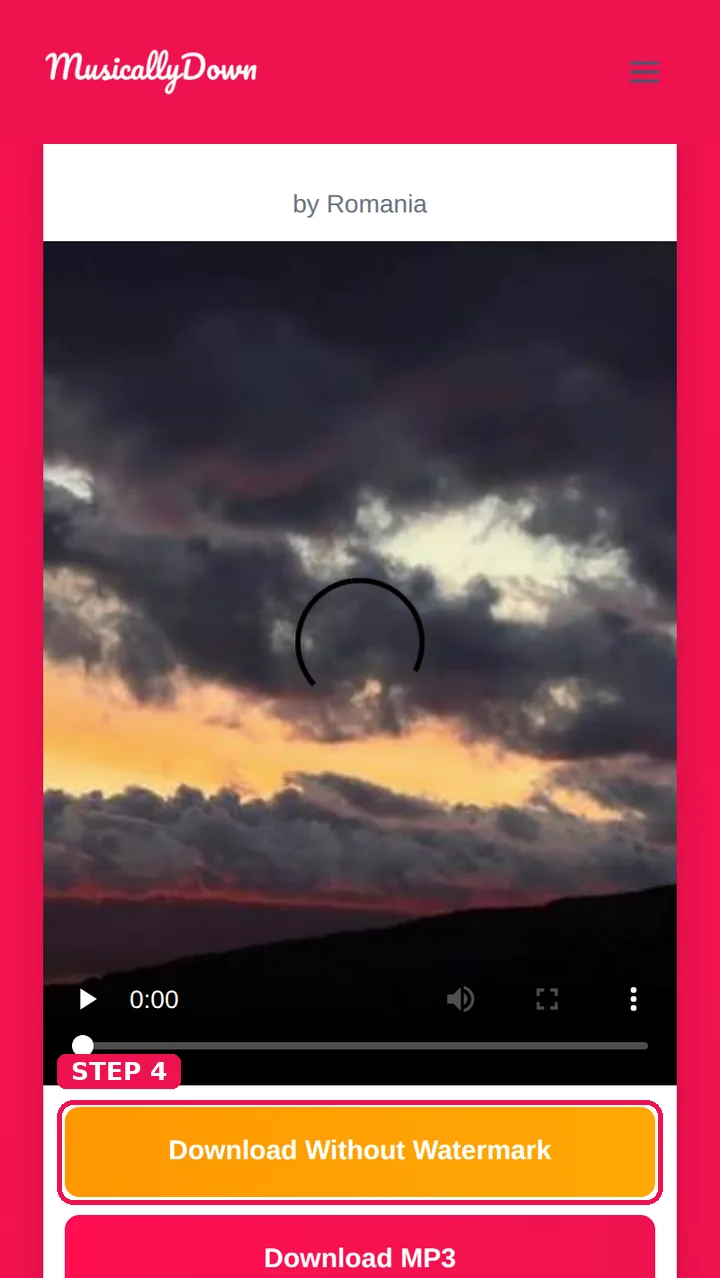
When the link is complete and the post is public, your choices appear within a few seconds. If nothing shows up, the post is probably private or deleted, or part of the link went missing — the troubleshooting table and the questions at the bottom of this page cover the usual cases.
Not Sure Which Tool You Need?
The box above handles everything, but each job also has a dedicated page if you would rather go straight to it:
- You just want the video as a file: TikTok to MP4 — video downloads, with the standard and HD choices explained.
- Only the audio matters: TikTok to MP3 — pulls a post’s sound track out on its own.
- You are keeping videos for the long term: TikTok Video Saver — how to save and organise a collection that lasts.
- The watermark is the whole problem: TikTok Watermark Remover — why the clean original beats every “removal” trick.
- It is a slideshow of photos: TikTok Photo Downloader — every photo separately, at full size.
- It is a story that is about to vanish: TikTok Story Downloader — live and working now, not a “coming soon” promise.
Why People Use MusicallyDown
- No watermark. The save button inside TikTok stamps a moving watermark and the creator’s name onto the video. Files from MusicallyDown are the clean originals, so they stay presentable anywhere you watch them.
- Original quality. You receive the video at the quality it was uploaded in, with an HD option whenever TikTok holds one — never a screen recording.
- All formats, one place. Video, photo slideshows, stories and audio all run through the same box. No separate tools and no tab juggling.
- Any device works. The tool lives in the browser and runs on Android, iPhone, Windows, Mac and Linux — anything with a modern browser can download.
- Nothing to install. No app download, no browser extension, no sign-up form. The page you are reading is the entire product.
- Private by design. A link is processed when you submit it and the file travels straight to your device. We keep no copies of the videos you download, and there is no account that could connect downloads to a person.
Downloading on Android
On an Android phone the whole job takes under a minute. Grab the link from the TikTok app with Share → Copy Link, open this page in Chrome or your usual browser, paste, and download.
The video lands in your Downloads folder and shows up in your gallery or file manager as an MP4 — play it offline, share it into other apps, or back it up. Photo posts arrive in the same folder as individual images. If your browser asks where to save, the default Downloads location is the one you will actually find again later.
Downloading on iPhone and iPad
For the smoothest result on iOS, use Safari. Copy the link in the TikTok app, open MusicallyDown in Safari, paste and download. When the transfer finishes, iOS offers to save the file: videos can go into the Files app, and from there the share sheet moves them into Photos.
MP3 audio saves to Files in exactly the same way. If a download seems to have disappeared, check the Files app under Downloads before trying again — on iPhone, that folder is where Safari puts almost everything.
Downloading on a Computer
On Windows, Mac or Linux, getting the link is simpler still: open the post on tiktok.com and copy the complete address from the browser bar. Paste it here, download, and the file turns up in your browser’s Downloads folder at full resolution — handy for archives, editing projects and bigger screens. And because nothing is installed, the tool also works on shared or work computers where adding software is not an option.
TikTok to MP3 — When Only the Sound Matters
Plenty of TikTok posts are really about the audio: a song fragment, a remix, a podcast highlight, a sound the whole platform is using. The MP3 option strips the picture away and saves just that sound track as an MP3 file you can play anywhere. Use the dedicated TikTok to MP3 page when audio is all you need, or press the MP3 button in the results here — both do the same job.
Photo Posts and Stories
TikTok is not only video any more. Slideshow posts carry a set of still photos, and MusicallyDown each one on its own at full size — the actual image files, not a video of the slideshow playing. Stories work too: paste the link of a story from a public account and save it before the 24-hour window closes. The TikTok Photo Downloader and TikTok Story Downloader pages go into each format in more detail.
Formats and Quality at a Glance
| What you paste | What you can save | Notes |
|---|---|---|
| Video post | MP4 with no watermark, HD MP4 when available, MP3 audio | Quality matches the original upload |
| Photo / slideshow post | Each photo as its own image file, MP3 audio | Full-size images, never screenshots |
| Story from a public account | MP4 video | Only while the story is still live |
| Any post that has sound | MP3 audio | The post’s complete sound track |
The Honest Pros and Cons
| Pros | Cons |
|---|---|
| Genuinely free, with no download caps | Public posts only — a private account’s content stays private, exactly as it should |
| No watermark and no loss of quality | TikTok only — there is no YouTube or Instagram downloading here |
| Every TikTok format handled by one tool | One link at a time; batch mode does not exist, by design |
| Nothing to install | A very new or region-restricted post occasionally refuses to fetch |
| No account, which means no password of yours exists here to be leaked | Result buttons expire quickly, and everything depends on the post still existing — once a creator deletes a video, no tool can restore it |
MusicallyDown vs TikTok’s Built-In Save Button
| MusicallyDown | TikTok’s save button | |
|---|---|---|
| Watermark | None | Moving watermark showing the username |
| Video quality | Original upload quality, HD when available | A compressed copy |
| Photo posts | Every photo saved separately | Exported as a slideshow video |
| Audio only (MP3) | Yes | No |
| Stories | Yes, from public accounts | Your own only |
| Creator has disabled downloads | Still works on public posts | Blocked |
| App required | No | Yes |
If Something Goes Wrong
Nearly every failure has a dull cause and a fast fix:
| Problem | Likely cause | What to do |
|---|---|---|
| Nothing appears after you press Download | The post is private or deleted, or the link is incomplete | Copy the link again with Share → Copy Link; do not rely on a shortened link forwarded in a chat |
| A download button has stopped responding | Result links are short-lived | Paste the post link again to generate a fresh set of buttons |
| The download never seems to start | The file was saved somewhere you did not check | Android/PC: look in the Downloads folder. iPhone: look in the Files app, then share sheet → Save Video to move it into Photos |
| The results show the wrong format | The link belongs to a different kind of post | Photo posts return photos, video posts return video options — double-check which post you copied |
| A video plays without sound | The audio was removed at the source | If it is silent inside TikTok as well, the sound track no longer exists |
A Note on Responsible Use
This tool exists so you can save videos for your own viewing. What you download still belongs to its creator: do not re-upload somebody else’s work as though it were yours, do not sell it, and do not strip a watermark in order to hide where content came from.
If you want to reuse a video beyond personal viewing, get the creator’s permission first. Creators who want their content kept out of our results can contact us and we will act on it — our DMCA page explains how.
Frequently Asked Questions
Yes — completely. There is no daily cap and no premium tier where the good options hide. The site is supported by advertising, which is why no feature sits behind a paywall.
No. Everything happens on this page in your browser, on phones and computers alike.
No. You never log in to anything here, and you do not need a TikTok account. A public post link is all the tool needs.
Because TikTok only adds the watermark at the moment a video leaves through its own save and share buttons. The file stored behind the post itself is clean, and that original file is what MusicallyDown fetches for you.
Not by uploading it — this tool accepts no file uploads, and a watermark that is part of the picture cannot be cleanly removed. Instead, find the original post and paste its link here; you will get the clean version of the same video.
The same quality the creator uploaded. When TikTok holds an HD version of a post, an HD download option appears next to the standard one.
On Android and computers, the Downloads folder. On iPhone, Safari saves to the Files app (Downloads folder), and from there you can move videos into Photos.
Yes. Paste a slideshow post link and each photo is offered as its own full-size image, alongside the post’s audio as an MP3.
Yes, from public accounts, while the story is still live — stories vanish after 24 hours, and a story that has already expired cannot be recovered.
No. Private content is visible only to approved followers inside TikTok, and this tool cannot and should not bypass that.
If the post is public, yes. The in-app setting only controls TikTok’s own save button; a public post’s file remains reachable through its link.
Make sure the whole link was copied — shortened links sometimes lose their tail. Check the post still exists and is public, then try again. Very fresh posts occasionally need a few minutes before they can be fetched.
Downloading for personal viewing is widely accepted, and TikTok’s own app offers saving for many videos. The legal line is crossed by re-uploading, selling, or claiming someone else’s work — that is about what you do with the file, and it is your responsibility.
No. Files pass straight through to your device; we do not keep a library of downloaded content or a history of your links beyond short-lived technical logs described in our Privacy Policy.
Yes. The audio track is part of the file and is saved untouched, at its original quality.
Yes — choose the MP3 option in the results, or use the dedicated TikTok to MP3 page.
You may have copied the link of a different post, or the post is a video with a photo cover. Re-open the slideshow in TikTok, copy its link again, and the photo options will appear.
Yes, in Safari. Save the file to the Files app, then move it to Photos from the share sheet if you want it in your gallery.
Yes. You only need the post’s link, which you can also copy from tiktok.com in any browser.
Finished posts work. A live stream that is still running cannot be saved; if the creator later posts the replay as a normal video, that link will work.
No fixed limit. Very rapid repeated use may be slowed briefly to keep the tool fast for everyone.
HD appears only when the original post itself is available in HD. If a creator uploaded in standard quality, that is the best version that exists.
None in the tool — the Watermark Remover page explains the watermark question in depth. Every video downloaded from any page here is watermark-free.
Yes. The tool never talks to your app; it works from the link alone.
No. Downloads through MusicallyDown do not send any notification to the creator.
Technically you can edit any file you have, but the rights stay with the creator. For anything public or commercial, ask their permission first — that is the rule we recommend in our responsible-use note above.
Any current browser — Chrome, Safari, Firefox, Edge and the browsers built into Android phones. Very old browsers may fail to start the download.
Usually a dropped connection. The file is not stored here, so simply run the same link again; on phones, staying on the page until the save dialog appears helps.
Find its original post and download it again through MusicallyDown — the fresh copy will be clean. There is no way to repair the watermarked file itself.
No — one link at a time, by design. There is no batch mode. It keeps the tool simple and free, and each video gets its own fresh check.
The download buttons on a results page are generated fresh for that check and are short-lived. If you return later, paste the post link again and you will get a new set of buttons.
The box at the top of this page does everything. If you want a focused page, the tool-picker section above points you to the right one — MP4 for video, MP3 for audio, the Saver for keeping videos long-term, the Watermark Remover for the watermark question, and the Photo and Story pages for those formats.
Yes. TikTok Lite posts use the same link format, and the tool reads them exactly like normal TikTok links.
No. MusicallyDown is an independent tool and is not affiliated with TikTok or ByteDance. (And whichever spelling brought you here — musicallydown or musicaldown — this is the tool you were looking for.)
Through the Contact page. Copyright owners (or their agents) can use the DMCA page for takedown requests, which we treat as priority.